BMTagger vs Bowtie2 for Human Read Removal — Day 2 of 5
🧬 Day 2 of 5 — Benchmarking Host-Read Removal for High-Host-Content Metagenomes
Yesterday I introduced the core challenge of host-read removal: the goal is not simply to remove as many human reads as possible, but to do so without discarding genuine microbial reads from the organisms you actually care about. In host associated metagenomics, where community composition can hinge on the relative abundance of a small number of taxa, that distinction is not academic — it determines whether your downstream biology is real or an artifact.
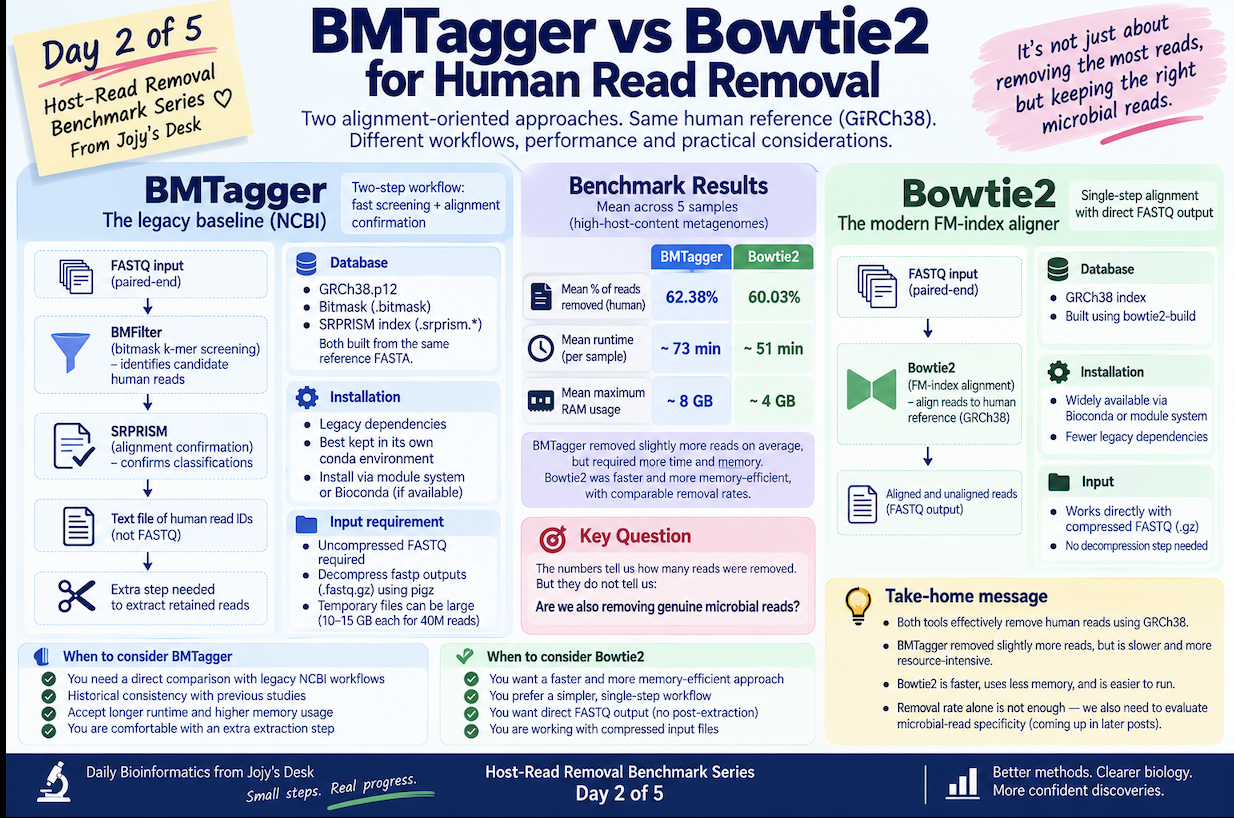
Today I am working through the first two methods in the benchmark: BMTagger and Bowtie2. Both are alignment-oriented approaches to host removal, both used GRCh38 as the human reference, and both support paired-end reads. But they differ substantially in workflow complexity, computational requirements, and how they handle the removed-vs-retained decision. Understanding those differences sets up everything that follows in the series.
BMTagger — the legacy baseline
BMTagger is an NCBI host-screening workflow that combines two sequential steps: a fast bitmask-based screening step to identify candidate human reads, followed by an SRPRISM alignment step to confirm classifications. It was the standard NCBI approach for human read removal for many years and is still used as a reference point in benchmarks precisely because of its history.
The workflow looks like this:
FASTQ input
    ↓
BMFilter (bitmask k-mer screening)
    ↓
SRPRISM (alignment confirmation)
    ↓
Text file of human read IDs
Notice the output is a list of read identifiers — not FASTQ files. An additional extraction step is needed to produce the actual retained-reads FASTQ for downstream analysis.
Database
The BMTagger run used a GRCh38.p12 database consisting of two pre-built index files:
- A bitmask (
.bitmask) — used by the fast k-mer screening step - An SRPRISM index (
.srprism.*) — used by the alignment confirmation step
Both must be built from the same reference FASTA before running.
Installation
BMTagger has legacy dependencies that can conflict with modern tools, so I kept it isolated in its own conda environment:
conda create -n bmtagger
conda activate bmtagger
# Install BMTagger via your HPC module system or conda channel
# conda install -c bioconda bmtagger   (if available)
Keeping legacy tools in isolated environments is good hygiene regardless of whether you are benchmarking — it prevents dependency conflicts that can subtly alter tool behavior.
One practical limitation: uncompressed input
The workflow I used expected uncompressed FASTQ files. The fastp outputs (.fastq.gz) had to be decompressed into a temporary working directory before BMTagger could run. I used pigz for parallel decompression:
pigz -dc sample_R1.fastp.fastq.gz > /tmp/sample_R1.fastq
pigz -dc sample_R2.fastp.fastq.gz > /tmp/sample_R2.fastq
This adds a step that the other tools in the benchmark do not require, and it has storage implications at scale — temporary uncompressed files for a 40M-read sample can be 10–15 GB each.
Running BMTagger
/usr/bin/time -v -o ${SAMPLE}_bmtagger.time.txt \
  bmtagger.sh \
    -b GRCh38_p12.bitmask \
    -x GRCh38_p12.srprism \
    -T ${TMP_DIR}/${SAMPLE} \
    -q 1 \
    -1 ${TMP_DIR}/${SAMPLE}_R1.fastq \
    -2 ${TMP_DIR}/${SAMPLE}_R2.fastq \
    -o ${OUTDIR}/${SAMPLE}_taggedHuman.txt
The key flags:
-
-b— bitmask database -
-x— SRPRISM index -
-T— temporary working directory (needs enough space for intermediate files) -
-q 1— input is FASTQ (not FASTA) -
-o— output prefix for the human read ID list
Extracting paired retained reads
Because BMTagger outputs a text file of read IDs rather than FASTQ files directly, a post-processing step is needed to extract the microbial reads you actually want:
# Get list of human read IDs from BMTagger output
grep -v "^#" ${OUTDIR}/${SAMPLE}_taggedHuman.txt > ${SAMPLE}_human_ids.txt

# Use seqtk to extract non-human reads (those NOT in the human ID list)
seqtk subseq ${TMP_DIR}/${SAMPLE}_R1.fastq \
    <(grep -Fxvf ${SAMPLE}_human_ids.txt <(grep "^@" ${TMP_DIR}/${SAMPLE}_R1.fastq | sed 's/^@//')) \
    > ${OUTDIR}/${SAMPLE}_bmtagger_nonhuman_R1.fastq

# Compress output
gzip ${OUTDIR}/${SAMPLE}_bmtagger_nonhuman_R1.fastq
This extraction step adds workflow complexity that Bowtie2 avoids entirely.
Bowtie2 — the modern alignment baseline
Bowtie2 uses an FM-index for fast short-read alignment and is one of the most widely used aligners in metagenomics preprocessing. For host removal, the logic is straightforward:
Paired FASTQ
    ↓
Align to human genome (GRCh38)
    ↓
Concordantly aligned pairs  →  human (discard)
Unaligned pairs             →  retain for microbiome analysis
One significant workflow advantage: Bowtie2 writes both human and non-human reads directly to FASTQ output in a single command, with no post-processing extraction step needed.
Building the reference index
bowtie2-build \
    GRCh38.fa \
    GRCh38_bowtie2_index \
    --threads 16
This step is slow (30–60 minutes for the full human genome) but only needs to be done once. Store the index in a shared location on the cluster so the same index is used for every sample.
Running Bowtie2
/usr/bin/time -v -o ${SAMPLE}_bowtie2.time.txt \
  bowtie2 \
    --very-sensitive \
    --threads 16 \
    -x ${BOWTIE2_INDEX}/GRCh38 \
    -1 ${SAMPLE}_R1.fastp.fastq.gz \
    -2 ${SAMPLE}_R2.fastp.fastq.gz \
    --un-conc-gz ${OUTDIR}/${SAMPLE}_nonhuman_R%.fastq.gz \
    --al-conc-gz ${OUTDIR}/${SAMPLE}_human_R%.fastq.gz \
    --met-file ${OUTDIR}/${SAMPLE}_bowtie2_metrics.txt \
    -S /dev/null
Key flags worth explaining:
-
--very-sensitive— uses the highest-sensitivity preset (-D 20 -R 3 -N 1 -L 20 -i S,1,0.50). For host removal, sensitivity matters more than speed — you want to find all the human reads, not just the easy ones -
--un-conc-gz— writes both reads of pairs that did NOT align concordantly to the human genome. The%is replaced by1and2for R1 and R2. These are your retained microbial reads -
--al-conc-gz— writes both reads of pairs that DID align concordantly. These are your human reads -
-S /dev/null— discards the SAM alignment output (we do not need it, and it would be enormous) -
--met-file— alignment metrics per sample, useful for QC
The --un-conc-gz and --al-conc-gz flags are the feature that makes Bowtie2 especially clean to work with for this purpose. No post-processing required — two output files per read, gzip-compressed, paired-end aware.
Side-by-side workflow comparison
| Feature | BMTagger | Bowtie2 |
|---|---|---|
| Input format | Uncompressed FASTQ (in this workflow) | Gzipped FASTQ directly |
| Human reference | GRCh38.p12 (bitmask + SRPRISM) | GRCh38 (FM-index) |
| Output format | Text file of human read IDs | Human + non-human FASTQ directly |
| Paired-end handling | Supported | Supported, explicit --un-conc-gz |
| Post-processing needed | Yes (extract retained reads) | No |
| Workflow complexity | Higher | Lower |
| Maintenance status | Legacy | Actively maintained |
| Role in this benchmark | Historical conservative baseline | Conventional modern alignment baseline |
Benchmark results
Across all five samples:
| Sample | BMTagger removed | Bowtie2 removed |
|---|---|---|
| Sample 1 | 94.88% | 89.76% |
| Sample 2 | 97.91% | 94.82% |
| Sample 3 | 22.51% | 21.72% |
| Sample 4 | 10.52% | 10.14% |
| Sample 5 | 86.07% | 83.71% |
| Mean | 62.38% | 60.03% |
BMTagger consistently removed a higher percentage of reads than Bowtie2 across all five samples. The difference ranges from less than one percentage point (Sample 4, low host content) to over three percentage points (Samples 1 and 2, very high host content).
The range of removal rates across samples is striking and reflects what was described on Day 1: host content varies enormously between individuals and sampling events. Sample 4 had only ~10% host reads; Samples 1 and 2 had ~90–98%. A method that performs well across this entire range is more broadly useful than one that is optimized for a narrow host-content regime.
What the removal percentages cannot tell you
BMTagger removed more reads. But this does not automatically mean BMTagger is more accurate. Those additional removed reads represent one of two possibilities:
- True human reads that Bowtie2 missed — in which case BMTagger is more sensitive and its additional removals are correct
- Microbial reads incorrectly classified as human by BMTagger — in which case its higher removal rate is actually a false-positive problem
Distinguishing between these two cases requires read-level discordance analysis, which comes on Day 5. For now, the removal rates establish the quantitative gap between methods and confirm that the two tools make different decisions — something worth investigating.
Computational performance
Approximate mean performance across the five samples:
| Tool | Mean wall-clock runtime | Approximate peak RAM |
|---|---|---|
| BMTagger | ~73 minutes | ~8 GB |
| Bowtie2 | ~51 minutes | ~4 GB |
Bowtie2 was approximately 30% faster and used roughly half the RAM of BMTagger. At scale — hundreds of samples, limited cluster allocation — this difference accumulates quickly. 25 additional CPU-hours across 20 samples is a meaningful budget difference.
These numbers were captured using the /usr/bin/time -v wrapper on every job:
/usr/bin/time -v -o ${SAMPLE}_${TOOL}.time.txt \
    tool_command ...
The verbose output includes:
Elapsed (wall clock) time:       1:13:12.48
Maximum resident set size:       8,124,456 KB
User time (seconds):             1847.23
System time (seconds):           12.41
Percent of CPU this job got:     42%
The CPU percentage is also informative. BMTagger’s 42% utilization on a 16-thread node suggests it is not parallelizing efficiently across all available cores — something to keep in mind when allocating cluster resources.
What Day 2 established
Two alignment-oriented tools using the same broad human reference can produce noticeably different removal rates. On very high-host samples (Samples 1 and 2), the gap between BMTagger and Bowtie2 is 3–5 percentage points. That translates to millions of read pairs in absolute terms on 40M-read libraries.
The operational lesson is equally clear: workflow simplicity is not trivial. BMTagger requires decompressed input, produces a read-ID list rather than FASTQ output, and needs post-processing extraction. Bowtie2 reads gzipped files directly, writes both output streams in a single command, and integrates cleanly into a modern pipeline. At scale, these differences matter for the time you spend writing and debugging pipeline code, not just the time the tool itself takes to run.
Both tools established the baseline range against which the more modern approaches — BBMap and Cleanifier — will be evaluated tomorrow.
What comes tomorrow
Day 3 covers BBMap, with a specific focus on a question that this comparison naturally raises: if two tools using the same reference can produce different results, what happens when the same tool is run against two different human references?
BBMap will be run twice — once against the standard GRCh38 and once against a repeat-masked hg19 reference. The comparison isolates the reference effect from the algorithm effect and reveals something that is easy to overlook when benchmarking host-removal tools.
Day 1 of this series is here. Day 3 publishes soon.