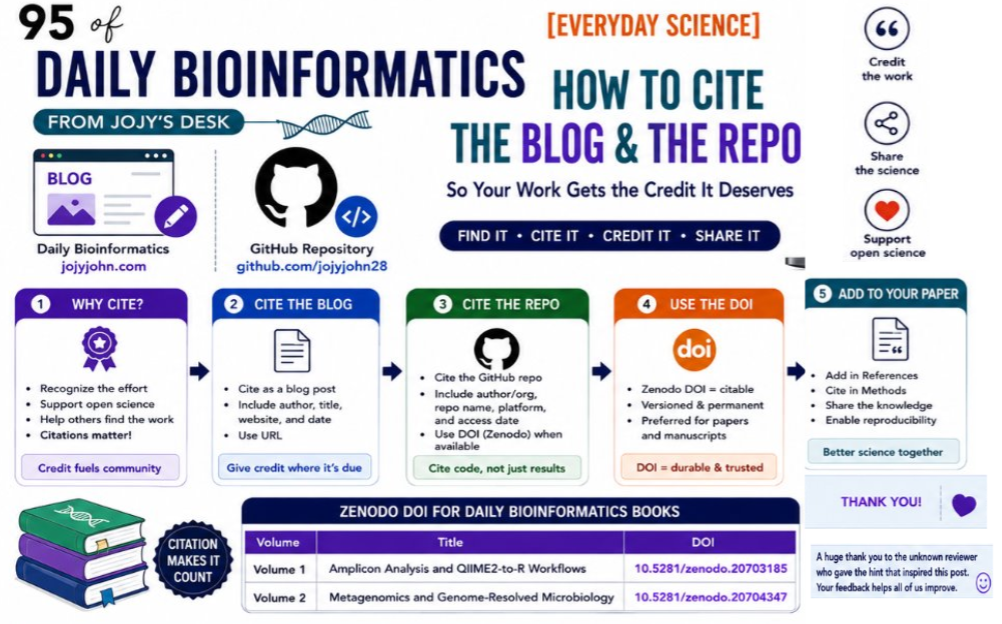
Your Code Is a Publication: How to Make Bioinformatics Workflows Citable with Zenodo
🧬 Day 95 of Daily Bioinformatics from Jojy’s Desk
Here is something that took me longer to realize than it should have: the workflow is the contribution, not just the paper that uses it.
A peer-reviewed paper gets cited when someone builds on your scientific findings. A well-documented, reproducible workflow gets used — and cited — when someone needs to do the same analysis you did. Those are different kinds of impact, and in modern computational biology, both matter.
The problem is that most bioinformatics workflows live in one of two places: a private HPC folder that nobody else can access, or a GitHub repository that has no permanent identifier and could disappear if the account is deleted. Neither of these is a citable scholarly output.
This post is about fixing that — archiving your work in a way that makes it permanently findable, permanently citable, and part of your formal academic record. The tool for this is Zenodo, and the process takes about 20 minutes.
What counts as a citable output?
Academia is slowly catching up to the reality that not all contributions to science look like journal articles. Funding agencies, universities, and professional societies increasingly recognize:
- Software — analysis tools, R packages, Python libraries
- Workflows — documented analysis pipelines with code and instructions
- Datasets — curated data products that others can use
- Educational resources — tutorials, teaching materials, learning series
The key requirement is that these need a permanent identifier — specifically a DOI (Digital Object Identifier), the same kind of identifier that a journal article has — so that they can be cited in a standardized, traceable way.
Zenodo provides this for free.
What is Zenodo?
Zenodo is an open-access repository operated by CERN (yes, the particle physics people). It was built to solve exactly this problem: giving researchers a permanent, citable home for research outputs that do not fit neatly into a journal.
When you upload a workflow or dataset to Zenodo:
- It gets a permanent DOI (e.g.,
10.5281/zenodo.20703185) - The DOI never expires — even if the GitHub repository moves or is deleted, the Zenodo record remains
- The upload is versioned — you can update the resource and release new versions, each with its own DOI, while the original DOI always resolves
- It is indexed by DataCite and increasingly by Google Scholar
- It is free for open-access content up to 50 GB per record
My current published resource
My first archived resource is now live:
Bioinformatics Learning Series — Volume 1
Amplicon Analysis and QIIME2-to-R Workflows
DOI: 10.5281/zenodo.20703185
GitHub: github.com/jojyjohn28/bioinformatics-learning-series-volume1
What it contains:
- Amplicon sequencing workflows (16S, ITS)
- QIIME2 analysis tutorials from raw reads to diversity analysis
- QIIME2-to-R integration workflows (phyloseq, vegan)
- Visualization workflows (ggplot2, heatmaps, ordination)
- Functional prediction resources (PICRUSt2, Tax4Fun)
- Web-based microbiome analysis tool guides
This is a living educational resource — it will grow as I add more content, and each major version will get its own DOI.
How to archive your own workflow on Zenodo
The process is straightforward. Here is exactly what I did.
Step 1 — Prepare your GitHub repository
Before archiving, make sure your repository is in a state worth preserving:
your-repo/
├── README.md          # Clear description of what the workflow does
├── scripts/           # All code, well-commented
├── data/example/      # Small example dataset if possible
├── environment.yml    # Conda environment or requirements.txt
└── LICENSE            # Choose an open license (MIT, CC-BY recommended)
A good README is the most important thing. It should include: what the workflow does, what inputs it requires, how to run it, what outputs it produces, and how to cite it.
Step 2 — Connect GitHub to Zenodo
- Go to zenodo.org and sign in with your GitHub account
- Go to your Zenodo profile → GitHub
- You will see a list of your GitHub repositories
- Toggle ON for the repository you want to archive
Step 3 — Create a release on GitHub
Zenodo archives a specific version — not a live repository. Create a release to trigger the archive:
- On GitHub, go to your repository → Releases → Create a new release
- Set a version tag:
v1.0.0 - Add release notes describing what is in this version
- Click Publish release
Within a few minutes, Zenodo automatically archives the release and assigns a DOI.
Step 4 — Add metadata on Zenodo
Go to your Zenodo record and fill in:
- Title — descriptive and searchable
- Authors — your name, institution, ORCID
- Description — what the workflow does, who it is for
- Keywords — include tool names (QIIME2, DESeq2, etc.) and analysis type (amplicon, metagenomics, etc.)
- License — match your GitHub repository license
- Resource type — choose Software or Educational resource
Good metadata is what makes your resource findable. Think about what someone would search for if they needed your workflow.
Step 5 — Copy the DOI badge to your README
Zenodo gives you a badge you can embed in your GitHub README:
[](https://doi.org/10.5281/zenodo.20703185)
This makes the DOI immediately visible to anyone who visits the repository.
Adding the resource to your academic profile
ORCID
ORCID (your persistent researcher identifier) supports software, datasets, and educational resources as work types. This is where it matters most for job applications and grant submissions.
- Log in at orcid.org
- Go to Works → Add Work → Add DOI
- Enter:
10.5281/zenodo.20703185 - ORCID will auto-populate the metadata from Zenodo
- Set visibility to Public
- Save
Your workflow now appears in your ORCID profile alongside your journal articles — as a peer-equal entry in your works list.
Google Scholar
Google Scholar does not yet have a dedicated section for software or educational resources, but Zenodo records are increasingly being indexed automatically. Check your Google Scholar profile periodically — once the record is indexed, it will appear under your name.
In the meantime:
- Enable automatic updates in Google Scholar settings so new indexed works are added to your profile
- If the record appears, add it manually if the auto-update misses it
Your CV
Create a dedicated section — separate from publications:
Software, Workflows, and Educational Resources
John J. (2026). Bioinformatics Learning Series Volume 1: Amplicon Analysis and QIIME2-to-R Workflows. Zenodo. https://doi.org/10.5281/zenodo.20703185
This section signals to hiring committees and grant reviewers that you contribute to the community beyond your own papers.
Your website
Add a dedicated Resources or Teaching page that lists each archived workflow with its DOI, description, and link. This is where prospective lab members, collaborators, and people who found you through Google will look for your materials.
The long-term vision
The Bioinformatics Learning Series is planned across three volumes, each targeting a distinct area of environmental metagenomics and microbial ecology:
Volume 1 — Amplicon Analysis and QIIME2-to-R Workflows
Status: ✅ Published — DOI: 10.5281/zenodo.20703185
Amplicon sequencing from raw reads through community analysis, diversity metrics, and R-based visualization.
Volume 2 — Metagenomics and Genome-Resolved Microbiology
Status: ✅ Published DOI: 10.5281/zenodo.20704347
Several other volumes are in preparation
Why this matters beyond citation counts
I want to be direct about the career dimension here, because it is often not discussed openly.
Citable software, workflows, and educational resources demonstrate things that a publication list alone cannot show:
Community contribution — Other researchers are using and building on your methods. Downloads and citations of a workflow are evidence of real-world impact that goes beyond the specific paper the workflow was published alongside.
Reproducibility — Depositing your analysis code and workflow on Zenodo demonstrates a commitment to reproducible science. Grant agencies increasingly require this. Journals increasingly require it. Getting ahead of this is not optional for the next generation of researchers.
Technical breadth — A workflow repository shows what you can actually do: not just that you ran an analysis and reported results, but that you can document, package, and communicate a computational method well enough that others can use it.
Educational contribution — Tutorial series and teaching workflows demonstrate that you can communicate complex methods to a broad audience. This is directly relevant to faculty positions, where teaching and mentoring are evaluated alongside research.
For immigration-based applications (O-1, EB1A) specifically, evidence that your work has been adopted by others in the field — measured through downloads, citations, and GitHub stars — can serve as objective evidence of extraordinary ability and recognition. A workflow with 500 downloads and 10 citations is a concrete, quantifiable contribution that can be documented.
The five-output principle
Every major bioinformatics workflow developed during research should ideally produce five things:
1. A manuscript (journal article)
2. A GitHub repository (code and documentation)
3. A Zenodo DOI (permanent, citable archive)
4. A blog post or tutorial (accessible explanation)
5. A reusable educational resource (teaching material)
Most workflows produce only the first one, sometimes the second. The other three take relatively little additional time once the work is done, but they compound in impact over years. A blog post written in two hours in June 2026 might be the resource that helps a PhD student in 2028 get started with metatranscriptomics. That student might cite the Zenodo record. That citation might matter in a grant application.
Build the habit of producing all five outputs, not just the manuscript.
Tracking your impact
Keep a simple spreadsheet:
| Resource | DOI | Downloads | Views | Citations | Last checked |
|---|---|---|---|---|---|
| Volume 1 | 10.5281/zenodo.20703185 | ||||
| Volume 2 | TBD | ||||
| Volume 3 | TBD |
Zenodo provides download and view statistics on every record. Update this quarterly. Over time, this data becomes part of your narrative about community impact — something concrete you can point to in grant applications and job letters.
Quick start — 20 minutes to your first Zenodo DOI
If you have a GitHub repository with analysis code or tutorial materials:
- Sign in to Zenodo with your GitHub account
- Enable the repository under Zenodo → GitHub
- Create a GitHub release (
v1.0.0) - Add metadata on the auto-created Zenodo record
- Copy the DOI badge to your README
- Add the DOI to your ORCID profile
- Add a CV section for Software and Educational Resources
That is it. Your workflow now has a permanent identifier, is archived independently of GitHub, and is part of your citable scholarly record.
Bioinformatics Learning Series Volume 1 is available at doi.org/10.5281/zenodo.20703185. Volume 2 (Metagenomics and Genome-Resolved Microbiology) is available at DOI: 10.5281/zenodo.20704347
citations
-
John J. (2026) Bioinformatics Learning Series Volume 1: Amplicon Analysis and QIIME2-to-R Workflows. Zenodo. DOI: 10.5281/zenodo.20703185
-
John, J. (2026). Bioinformatics Learning Series Volume 2: Metagenomics and Genome-Resolved Microbiology (Version 1.0.0). Zenodo. https://doi.org/10.5281/zenodo.20704347